LifeOS
 vs Structured: Different Approaches to Daily Planning
Both apps help people organize their days on iPhone. This comparison focuses on how they present planned time and unfinished responsibilities.
Structured organizes your day as a continuous chronological visual timeline integrating calendar events, reminders, and drag-and-drop time blocks.
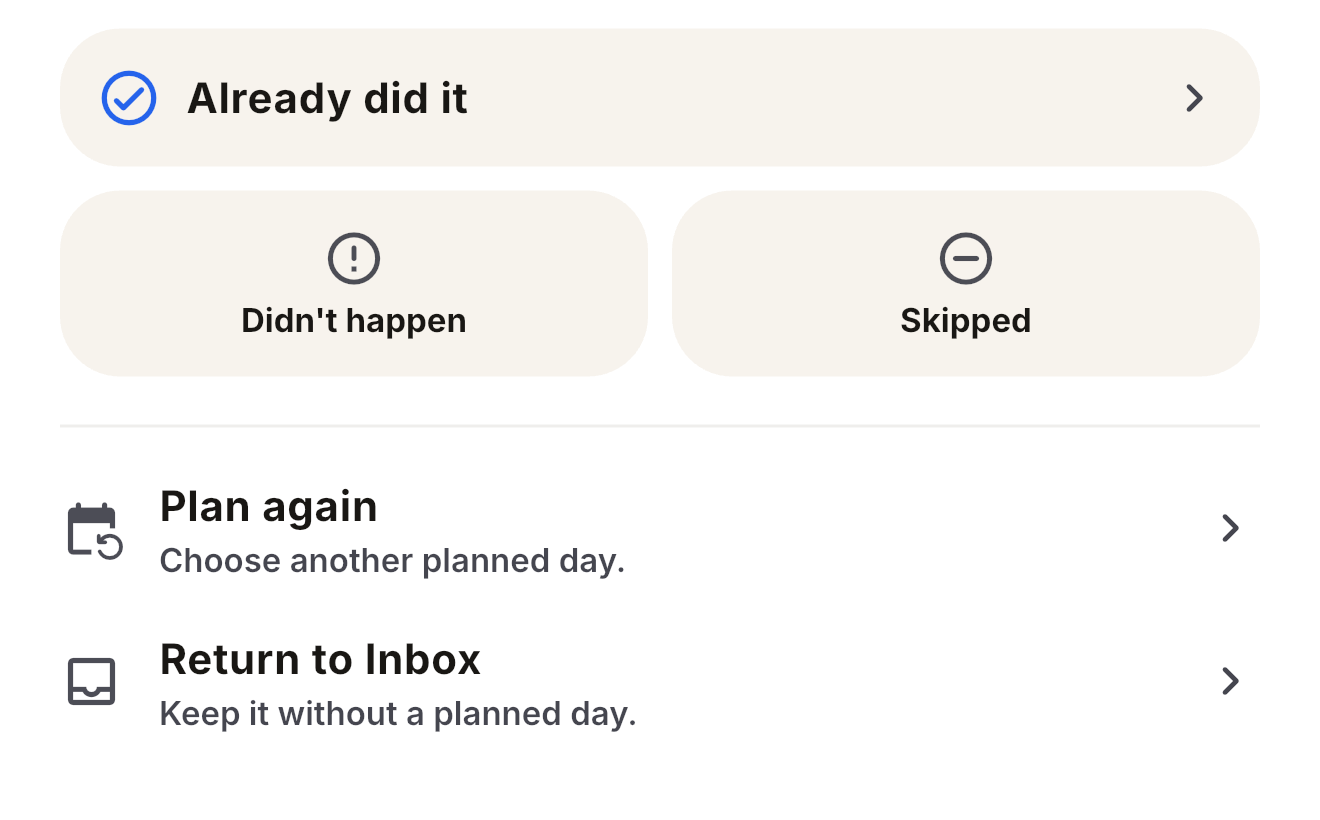
LifeOS organizes your day by separating task responsibility from calendar scheduling: active attention is focused on Current focus, Next, and Other tasks today, an ended time block never marks work complete (it simply expires the reserved window while the task remains open), and days are reviewed honestly (Completed, Missed, Skipped, Plan again) so past timelines reflect reality.
Published by Kaing Bunly, the developer of LifeOS. Check the linked product documentation and App Store listings for current availability and pricing.
Side-by-Side Comparison
| Dimension | Structured | LifeOS |
|---|---|---|
| Core Model | Continuous chronological timeline combining tasks and calendar events. | Current focus, Next, Other tasks today. Separates task responsibility from time reservations. |
| When Time Passes | Unfinished tasks can be revisited with Replan on supported Apple devices (Pro). | Reserved time block expires, but task responsibility stays open until explicitly marked complete or reviewed. |
| Unfinished Work | Replan offers check off, delete, reschedule, or move to Inbox. Structured AI can suggest schedule changes. | Explicit outcome and planning choices: Completed, Missed, Skipped, or Plan again. |
| Calendar Integration | Imports compatible external calendar events with Structured Pro; calendar tasks do not sync back. | Schedule reserves time and can link to Tasks. Task planning and final outcomes remain separate. |
| Historical Record | Past tasks can be revisited, checked off, or rescheduled. | What became true stays: Truthful history of confirmed outcomes and corrections. |
| Platforms | Apple devices, Android, and Web; feature availability differs. | iOS (iPhone & iPad, iOS 15.6+). |
| Routines & Habits | Recurring tasks, icons, and colors; availability varies by platform and plan. | Focuses on dynamic daily reality and execution clarity over habit tracking. |
| Focus Mode | Focus timer, Pro intervals, and Live Activities on supported Apple devices. | Current focus / Next / Other tasks card hierarchy + glanceable continuous widgets. |
| Pricing | See Structured’s current Pro options; prices and availability vary by store and region. | See the current LifeOS App Store listing for price and availability. |
Where Structured is Stronger
Structured may fit workflows that need these documented capabilities:
- Broad Multi-Platform Ecosystem: Structured offers Apple and Android apps plus browser access. This LifeOS comparison focuses on the iPhone experience; check Structured’s current platform-specific feature availability.
- External Calendar Import: Structured Pro imports compatible external calendar events. Its calendar import documentation explains supported calendars and the one-way limitation.
- Extensive Habit & Routine Features: Structured supports recurring tasks with configurable icons and colors.
- Structured AI Assistant: Structured AI can suggest tasks and schedule edits from your instructions; availability differs by platform and plan.
Where LifeOS Takes a Different Approach
LifeOS keeps task responsibility, reserved time, and recorded outcomes separate:
- Separation of Responsibility and Schedule: If an urgent call interrupts reserved work time, the responsibility may still need attention. In LifeOS, tasks hold responsibility and schedule holds reserved time. An expired block does not erase or auto-complete the task—the reserved window simply ends while the underlying task remains open until you act on it.
- A Focused Today View: LifeOS uses a focused view of the day. Its focus architecture (Now, Next, Remaining) presents Current focus, previews Next, and lists Other tasks today separately.

- Truthful Historical Reflection: LifeOS treats overdue as a signal and missed as an honest decision. Its Timeline preserves what actually happened (Completed, Missed, Skipped), with outcome dates and confirmation times kept distinct.
- Explicit Outcomes: You explicitly record completion, Missed, or Skipped. Plan again and Return to Inbox keep the Task open. Completion retains its truth-date choice; reserving time does not make an outcome decision.
Which App Fits Your Workflow?
Choose Structured if:
- You want your entire 24-hour day mapped out in an end-to-end visual timeline.
- You want compatible external calendar events displayed alongside your tasks.
- You regularly plan on a Mac, Apple Watch, or Android phone.
- You want AI-assisted schedule suggestions and configurable task icons.
Choose LifeOS if:
- Your plans change and you want to explicitly decide what happens to unfinished Tasks.
- You want tasks to remain responsibilities even when time blocks expire.
- You want active focus narrowed to your Current focus and Next block without scrolling a full-day timeline.
- You value an honest historical record of what became true over an idealized plan.
- You prefer to keep reserved time separate from task outcomes.
Questions about planning with LifeOS
Is LifeOS an alternative to Structured for iPhone?
LifeOS may suit you if you want Task responsibility, reserved time, and recorded outcomes kept separate. Structured may suit you if you prefer planning on a continuous daily timeline with its documented calendar imports. The better fit depends on how you want to plan.
What happens to an unfinished Task when reserved time ends?
The Task stays open until you act on it. An expired Schedule block alone does not make it overdue or Missed. Overdue depends on the open Task’s deadline; final outcomes require your explicit decision.
Can I move an unfinished Task to another day?
Yes. Change the Task plan date, or Return to Inbox if you do not want a plan date yet. Both keep the Task open. Reserving Schedule time is separate, and unfinished work does not automatically roll into tomorrow.
Explore the LifeOS Method
Plan time. Track reality.
See LifeOS on the App Store.